
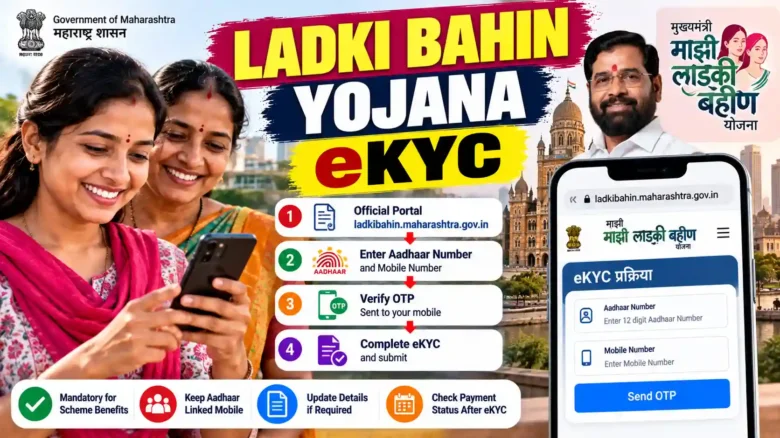
October 12, 2026: The Women and Child Development Department of Maharashtra has issued a critical update regarding the Mukhyamantri Majhi Ladki Bahin Yojana. Beneficiaries across the state who are yet to complete their mandatory electronic Know Your Customer (eKYC) verification are advised to do so immediately to ensure uninterrupted monthly direct benefit transfers (DBT) of ₹1,500. With the state government streamlining financial distribution for late 2026 installments, fulfilling the eKYC requirement remains mandatory for all enrolled women.
Ladki Bahin Yojana 2026: Overview Highlights
To provide a quick snapshot for beneficiaries, the official key details regarding the Mukhyamantri Majhi Ladki Bahin Yojana eKYC verification process are summarized in the table below:
| Parameters | Details |
|---|---|
| Scheme Name | Mukhyamantri Majhi Ladki Bahin Yojana |
| State / Department | Maharashtra / Women and Child Development Department |
| Monthly Financial Assistance | ₹1,500 per month (transferred via DBT) |
| Verification Requirement | Mandatory Aadhaar-based eKYC & Bank NPCI Seeding |
| Primary Channels | Official Web Portal & Nari Shakti Doot Mobile App |
| Offline Assistance | Common Service Centres (CSC), Setu Kendra, Gram Panchayat |
| Official Portal | ladkibahin.maharashtra.gov.in |
Why eKYC is Mandatory for Ladki Bahin Beneficiaries in 2026
The Maharashtra government introduced mandatory eKYC verification to maintain transparency, eliminate duplicate or non-existent accounts, and ensure that financial assistance directly reaches eligible women. Under current regulatory guidelines as of October 2026, direct benefit transfers are processed strictly through Aadhaar-enabled Payment Systems (AePS).
Failure to complete the eKYC process can lead to a temporary pause in installment releases. Beneficiaries whose Aadhaar cards are not linked with their active bank accounts or whose biometric records are outdated must resolve these discrepancies to prevent payment rejections by the Public Financial Management System (PFMS).
Step-by-Step Guide to Complete Ladki Bahin Yojana eKYC Online
Eligible women can conveniently complete their eKYC online from home using a smartphone or computer. Follow these detailed steps to complete the verification seamlessly:
Method 1: Via the Official Portal (ladkibahin.maharashtra.gov.in)
- Visit the official portal at ladkibahin.maharashtra.gov.in.
- Click on the ‘Applicant Login’ option on the homepage.
- Enter your registered mobile number, password, and the displayed captcha code, then click on ‘Login’.
- Navigate to the dashboard and select the ‘eKYC Verification’ tab.
- Enter your 12-digit Aadhaar Number carefully and click on ‘Send OTP’.
- An OTP will be dispatched to the mobile number registered with your Aadhaar card. Enter the OTP in the designated field and click ‘Verify’.
- Verify your personal details displayed on the screen (Name, DOB, Address). Upon successful validation, submit the form.
Method 2: Via the Nari Shakti Doot App
- Open the official Nari Shakti Doot app on your Android or iOS smartphone.
- Log in using your registered mobile number and complete the OTP authentication.
- Navigate to the ‘Profile / eKYC’ section within the app interface.
- Input your Aadhaar details and authenticate via Aadhaar-linked OTP or Face Authentication (if enabled).
- Once verified, a confirmation message reading ‘eKYC Completed Successfully’ will appear on your screen.
Offline eKYC Process at CSC / Setu Kendra
For women who do not have an active mobile number linked to their Aadhaar or who face technical glitches during online verification, offline eKYC facilities are active across Maharashtra:
- Visit Nearby Centres: Head to the nearest Common Service Centre (CSC), Setu Kendra, or local Gram Panchayat office.
- Documents Required: Carry your original Aadhaar Card, Bank Passbook, and registered mobile handset.
- Biometric Authentication: The official operator will scan your fingerprint or iris using an authorized biometric scanner connected to the Aadhaar database.
- Confirmation Receipt: Once biometric validation succeeds, request a printed acknowledgement receipt from the CSC operator for your record.
How to Check Ladki Bahin eKYC & Application Status Online
If you have already submitted your eKYC verification and want to confirm whether your account is fully active for upcoming payments, follow these verification steps:
- Log into the official Ladki Bahin portal using your credentials.
- Click on ‘Check Application / eKYC Status’.
- Enter your Application ID or Aadhaar Number.
- The status screen will display one of the following statuses:
- eKYC Status: Approved / Completed: Your account is fully active and ready for installment transfers.
- eKYC Status: Pending: Verification is under process; check back after 48 hours.
- NPCI Seeding Failed: Your Aadhaar is verified, but your bank account is not linked to the National Payments Corporation of India (NPCI) mapper.
Troubleshooting Common eKYC Errors and Issues
Many beneficiaries encounter minor roadblocks during the eKYC process. Here is how to resolve the most frequent issues:
1. OTP Not Received on Mobile Number
Ensure that your mobile number is actively linked to your Aadhaar card via the UIDAI database. If your phone number has changed, visit an Aadhaar Enrolment Centre to update your registered mobile number.
2. Name Mismatch Between Aadhaar and Bank Account
If your spelling differs between your Aadhaar card and bank account passbook, the PFMS system will flag a mismatch. Update your bank passbook name details at your bank branch to match your official Aadhaar card.
3. Bank Account NPCI Mapping Discrepancy
Having a bank account is not enough; it must be explicitly seeded with NPCI for Direct Benefit Transfer (DBT). Visit your bank branch and submit an ‘Aadhaar Seeding / DBT Enabling’ form.
Frequently Asked Questions (FAQs)
Q1: What is the official portal for completing Ladki Bahin Yojana eKYC in 2026?
The official web portal is ladkibahin.maharashtra.gov.in. Beneficiaries can also use the Nari Shakti Doot mobile application available on official app stores.
Q2: Is eKYC mandatory for existing beneficiaries who have already received previous installments?
Yes. Periodic eKYC and Aadhaar-bank account validation updates are mandatory for all existing beneficiaries to continue receiving the regular monthly assistance of ₹1,500.
Q3: What documents are needed for offline eKYC verification?
You need your original Aadhaar card, registered mobile phone, and bank passbook. No physical photo copies need to be submitted if biometric verification is completed at CSC centres.
Q4: How long does it take for eKYC status to update online after submission?
Online OTP-based eKYC updates instantly in most cases. However, biometric-based CSC verification or NPCI bank status updates may take 24 to 72 hours to reflect on the portal.
Q5: Is there any fee for completing eKYC at CSC centres?
No fee should be charged for standard scheme verification at government setups. State guidelines stipulate that eKYC assistance for government welfare schemes must be facilitated transparently.